
SMB vs NFS: Architecture, Security, Performance, and When to Use Each
Network file sharing remains a foundational component of enterprise IT, embedded systems, storage platforms, and cloud infrastructure. Despite shifts toward object storage and cloud-native services, two protocols continue to dominate file-based access: SMB (Server Message Block) and NFS (Network File System).
Both are mature and widely deployed. Yet they differ significantly in architecture, security models, ecosystem alignment, and operational behavior. Understanding these differences is critical when designing storage systems, integrating heterogeneous environments, or selecting a protocol for a specific workload.
This article provides a technical comparison of SMB and NFS, including architecture, security, performance characteristics, use cases, and how they can coexist in modern environments.
What Is SMB?
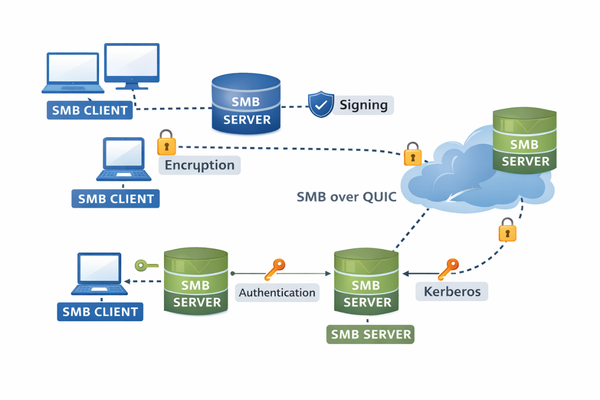
Server Message Block (SMB) is a network file sharing protocol originally introduced by IBM and later extended and standardized primarily by Microsoft. It is the native file-sharing protocol of Windows systems but is broadly implemented across operating systems. For example, MacOS includes built-in SMB client and server support. On other platforms, SMB is a built‑in but non‑primary file sharing protocol which means that the OS implements it via user‑space services.
Modern deployments use SMB 2.x and SMB 3.x, with SMB 3.1.1 being the current widely adopted version.
Key Characteristics of SMB
- Stateful protocol with session and tree connections
- Deep integration with Active Directory
- Authentication support (Kerberos preferred; NTLM supported for legacy compatibility)
- Built-in encryption (AES-GCM and AES-CCM, 128-bit and 256-bit variants)
- SMB signing for message integrity
- Pre-authentication integrity (SMB 3.1.1)
- Multichannel support for parallel network interfaces
- Continuous Availability for clustered deployments
- Durable and persistent file handles
Typical SMB Environments
- Windows enterprise networks
- Hybrid Windows/Linux environments
- Enterprise NAS systems
- Virtual desktop infrastructure
- Embedded devices requiring Windows interoperability
- Secure remote file access, including SMB over QUIC
SMB has evolved significantly from its early versions and includes advanced security, performance, and high-availability features tailored for enterprise environments.
What Is NFS?
Network File System (NFS) was developed by Sun Microsystems and is native to Unix and Linux ecosystems. It remains the dominant file-sharing protocol in Linux-centric and HPC environments.
Commonly deployed versions include:
- NFSv3
- NFSv4
- NFSv4.1
- NFSv4.2
Key Characteristics of NFS
- Originally stateless (v2/v3), stateful in v4+
- UID/GID-based access control model
- RPC-based architecture
- Tight integration with Linux kernel VFS
- Kerberos authentication support (sec=krb5, krb5i, krb5p)
- Parallel NFS (pNFS) in v4.1+
Typical NFS Environments
- Linux server farms
- HPC and scientific computing clusters
- Container orchestration platforms
- Cloud-native infrastructure
- Unix-based legacy systems
NFS emphasizes simplicity and strong alignment with Unix file semantics, making it highly efficient in Linux-dominant infrastructures.
Architectural Comparison: SMB vs NFS
Although both protocols provide remote file access, their architectural philosophies differ.
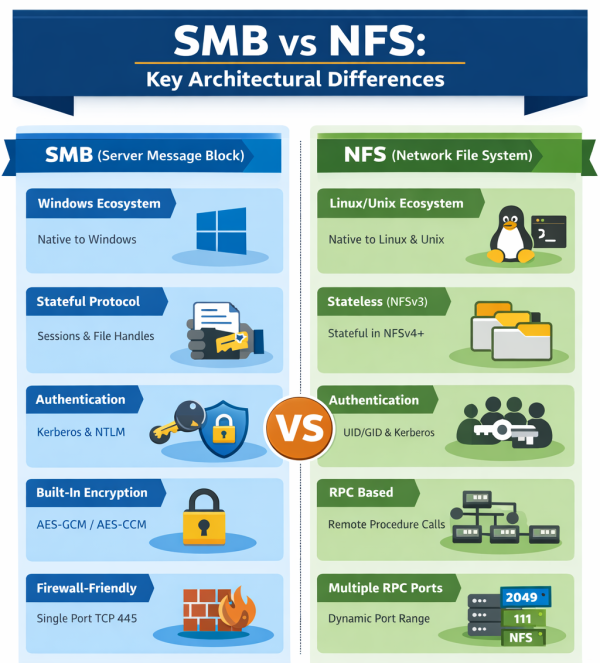
1. Operating System Alignment
- SMB: Native to Windows; strong integration with Windows security and directory services.
- NFS: Native to Unix/Linux; aligned with POSIX semantics.
2. Protocol Statefulness
- SMB: Fully stateful. Maintains sessions, file handles, and locking state.
- NFSv3: Stateless.
- NFSv4+: Stateful with session and locking improvements.
Statefulness affects locking behavior, recovery mechanisms, and scalability design.
3. Authentication Model
- SMB:
- Kerberos (preferred in enterprise)
- NTLM (being phased out in hardened environments)
- Integrated with Active Directory
- NFS:
- AUTH_SYS (UID/GID-based, weaker security)
- Kerberos modes:
- krb5 (authentication)
- krb5i (integrity)
- krb5p (privacy/encryption)
SMB’s authentication model is generally more tightly coupled with centralized identity infrastructure.
4. Security Features
- SMB 3.x:
- Native encryption
- Signing
- Pre-auth integrity
- Advanced dialect negotiation
- NFSv4+:
- Security depends on configuration
- Kerberos required for strong security
- Historically relied on trusted networks
Out-of-the-box security posture typically differs depending on deployment defaults.
5. Firewall and Network Behavior
- SMB:
- Uses TCP port 445
- More firewall-friendly
- Well-defined connection model
- NFSv3:
- Uses multiple RPC ports, can complicate firewall configuration
- NFSv4+:
- Consolidates to a single port (2049), simplifying network policy management
SMB vs NFS Technical Comparison – Summary Table
Category | SMB (Server Message Block) | NFS (Network File System) |
Primary Ecosystem | Windows-native; Active Directory integration | Unix/Linux-native; POSIX aligned |
Current Versions | SMB 2.x, 3.x, 3.1.1 | NFSv3, v4, v4.1, v4.2 |
Protocol State | Stateful | Stateless (v3); Stateful (v4+) |
Authentication | Kerberos preferred; NTLM for legacy | AUTH_SYS; Kerberos (krb5/krb5i/krb5p) |
Authorization | NTFS ACL model | UID/GID; NFSv4 ACLs |
Encryption | Native in SMB 3.x | Via Kerberos privacy mode |
Integrity | SMB signing; pre-auth integrity | Kerberos integrity mode |
High Availability | Continuous Availability; persistent handles | pNFS (v4.1+) |
Parallelism | Multichannel | pNFS |
Firewall | TCP 445; QUIC over UDP 443 | TCP 2049 (v4+); multiple ports in v3 |
WAN Support | Improved with SMB 3.x and QUIC | Requires tuning |
Typical Use | Enterprise Windows storage, VDI | Linux clusters, HPC |
Performance Considerations
Performance depends more on implementation and workload characteristics than on protocol alone. However, architectural differences influence behavior.
Factors Affecting Performance
- Network latency
- I/O size distribution
- Metadata intensity
- Locking patterns
- Caching strategies
- Encryption overhead
- Server implementation quality
SMB Performance Features
- Multichannel: Uses multiple network interfaces simultaneously
- Large Maximum Transmission Unit (MTU) support
- Durable handles reducing reconnection overhead
- Integrated encryption optimized in modern CPUs
NFS Performance Features
- Lightweight protocol overhead
- Kernel-level integration in Linux
- pNFS for parallel data paths
- Strong scalability in large compute clusters
In low-latency, Linux-dominant clusters, NFS often performs exceptionally well. In enterprise networks with advanced features like multichannel and continuous availability, SMB can provide strong throughput and resiliency.
There is no universal performance winner. Benchmark results depend on workload profile, tuning, and implementation maturity.
Security Comparison
Security posture is a critical selection factor.
SMB Security Model
- Native encryption in SMB 3.x
- Mandatory signing in hardened environments
- Pre-authentication integrity (SMB 3.1.1)
- Kerberos-first authentication trend
- Designed for operation in less trusted network environments
SMB has undergone significant hardening in recent years.
NFS Security Model
- NFSv3 often relies on trusted network assumptions
- Kerberos provides strong authentication and encryption when configured
- NFSv4 improves locking and security semantics
- Operational security depends heavily on configuration discipline
In modern deployments, both protocols can achieve strong security, but NFS may require more deliberate configuration to reach parity with SMB’s default capabilities.
When to Use SMB
SMB is often preferred when:
- The environment is Windows-dominant
- Active Directory integration is required
- Fine-grained enterprise authentication is needed
- Secure file access over untrusted networks is required
- High-availability clustered storage is used
- Remote office access must be secured with encryption
SMB 3.x is particularly well suited for enterprise-grade storage platforms.
Using SMB and NFS Together
In modern architectures, the question is often not SMB or NFS, but how to support both efficiently.
Common Dual-Protocol Scenarios
- Multi-protocol NAS systems exposing both SMB and NFS
- Storage systems serving Windows and Linux teams simultaneously
- Migration projects between Windows and Linux environments
- Cloud gateways supporting heterogeneous clients
- Unified back-end storage abstracted behind protocol-specific front ends
Supporting both protocols introduces challenges:
- Permission mapping between ACL-based and UID/GID-based systems
- Locking semantic alignment
- Identity federation
- Metadata consistency
Well-designed storage platforms abstract protocol differences at the back-end layer, allowing both SMB and NFS clients to access shared data while preserving security and consistency guarantees.
Conclusion
SMB and NFS are mature, widely deployed, and actively maintained protocols that continue to receive security, performance, and transport-layer enhancements.. Each aligns naturally with different operating system ecosystems and identity models.
SMB offers strong enterprise integration, advanced security capabilities, and features designed for modern Windows-centric infrastructures. NFS provides efficient, Unix-aligned semantics and remains dominant in Linux clusters and high-performance environments.
The appropriate choice depends on:
- Operating system ecosystem
- Security requirements
- Identity architecture
- Workload characteristics
- Deployment model
In many contemporary infrastructures, especially hybrid and multi-OS environments, supporting both protocols is not optional but necessary.
Understanding their architectural differences and operational trade-offs is essential for designing robust, secure, and performant file storage systems.

Lilia Wasserman, VP R&D, Visuality Systems