
Network file sharing forms the foundation of modern collaborative computing environments. The Common Internet File System protocol enabled Windows-based networks to share files across distributed systems. Understanding CIFS matters for IT professionals managing legacy systems and enterprise storage infrastructure.
Microsoft introduced CIFS as an enhanced version of the Server Message Block protocol in 1996. The protocol allowed computers running different operating systems to access shared files transparently over TCP/IP networks. While modern implementations have evolved beyond the original specification, the term persists in technical documentation.

What Exactly Is CIFS?
CIFS stands for Common Internet File System, a network protocol enabling applications to read, write, and request services from file servers. The protocol operates at the application layer, facilitating communication between clients and servers hosting shared resources.
CIFS extends beyond simple file transfer by supporting printer sharing, authentication services, and inter-process communication. The protocol originated from IBM’s Server Message Block work in the 1980s. CIFS maintained compatibility with earlier SMB implementations while extending capabilities.
Modern technical contexts often use CIFS and SMB interchangeably. This creates confusion about specific protocol versions. CIFS technically refers to the SMB 1.0 dialect published in 1996, while current SMB implementations incorporate significant architectural changes.
How Does CIFS Protocol Function?
CIFS implements a client-server architecture where client applications request services from server systems. Clients originate requests for file operations. Servers respond by providing access to shared resources. Applications trigger client requests through programming interfaces.
Communication begins when clients establish NetBIOS sessions with servers over TCP port 139 or direct TCP connections on port 445. Modern implementations favor port 445 connections, eliminating NetBIOS overhead. After establishing connectivity, clients and servers negotiate protocol dialects.
Authentication follows dialect negotiation, with clients presenting credentials to gain resource access. CIFS supports multiple authentication mechanisms including NTLM, Kerberos, and basic username/password validation. Active Directory environments typically use Kerberos for secure credential handling.
CIFS Protocol Features and Capabilities
Transport independence allows CIFS to operate over various underlying protocols beyond TCP/IP. While TCP connections dominate modern deployments, the protocol specification permits connectionless transport options. This flexibility enabled CIFS adoption across diverse network environments.
Multiple concurrent connections per client support complex application scenarios. A single client can maintain connections to several servers simultaneously. This architecture enables distributed file access patterns common in enterprise workflows.
File and directory change notifications alert clients when shared resources change. Windows File Explorer leverages this capability to display current folder contents automatically. This feature supports collaborative environments where multiple users interact with shared files.
Distributed File System support enables consistent naming across multiple servers and shares. DFS creates unified namespaces abstracting physical storage locations from user-visible paths. CIFS clients follow referrals to locate actual resources.
CIFS vs SMB: Understanding the Relationship
The relationship between CIFS and SMB causes persistent confusion in technical discussions. SMB represents the protocol family encompassing multiple versions developed over several decades. CIFS names a specific SMB variant Microsoft promoted during the late 1990s.
Protocol evolution moved beyond CIFS with SMB 2.0 introduction in Windows Vista. This major revision reduced protocol commands from over 100 to approximately 19. SMB 2.0 also introduced compounding, allowing multiple operations within single requests.
SMB 3.0 arrived with Windows 8 and Server 2012, bringing enterprise-critical features absent from CIFS. End-to-end encryption, multichannel connections, and transparent failover addressed data center requirements. The protocol continues evolving through versions 3.0.2 and 3.1.1.
Linux systems reference CIFS through kernel module and utility naming conventions. The cifs-utils package provides mounting capabilities while the kernel’s CIFS client supports SMB 2.x and 3.x connections. This naming reflects historical origins.
Why Is CIFS Considered Outdated?
Security vulnerabilities in the original CIFS implementation drive deprecation efforts industry-wide. The WannaCry ransomware attack exploited SMB 1.0 weaknesses to spread rapidly across networks globally. EternalBlue demonstrated severe risks inherent in the protocol’s design.
CIFS lacks encryption capabilities protecting data in transit. Modern security requirements mandate transport-layer protection the protocol cannot provide natively. Organizations relying on CIFS must implement additional measures like VPN tunnels.
Performance limitations affect CIFS operation over high-latency connections. The protocol’s chattiness degrades user experience on slower networks. SMB 2.0 and later versions reduced this overhead dramatically through command compounding.
Microsoft disabled SMB 1.0 by default starting with Windows 10 version 1709 and Windows Server 2019. Organizations should audit environments for CIFS dependencies and plan upgrade paths to modern SMB versions.
How to Mount CIFS Shares on Linux Systems
Linux systems access Windows shares using the CIFS kernel module and mount. cifs utility. The cifs-utils package provides necessary components on most distributions. Installation proceeds through standard package managers.
Basic mounting requires specifying server address, share name, mount point, and credentials. The command follows this pattern: sudo mount -t cifs //server/share /mnt/point -o username=user. Mount points must exist as empty directories before mounting.
Persistent mounts configured through /etc/fstab survive system reboots automatically. Credential files contain username, password, and optionally domain entries. Setting restrictive permissions on credential files prevents unauthorized access.
Protocol version specification addresses compatibility issues with modern servers. Adding vers=3.0 to mount options forces SMB 3.0 connections. Server-side logging helps diagnose connection failures by revealing protocol negotiation problems.
CIFS in Enterprise Storage Environments
Network-attached storage systems provide CIFS/SMB access as primary file-sharing functionality. Enterprise NAS platforms from NetApp, Dell EMC, and Pure Storage support multiple SMB protocol versions simultaneously. This ensures both legacy and modern clients can access resources.
Active Directory integration centralizes authentication for CIFS access in Windows environments. NAS systems join domains as member servers, inheriting user and group databases. Administrators assign permissions using familiar domain security principals.
Scale-out file systems leverage SMB 3.0 capabilities for cluster-wide access. Transparent failover maintains client connections during node maintenance. Multichannel connections aggregate bandwidth across multiple network interfaces.
Storage systems often present CIFS functionality while actually using modern SMB versions underneath. Purchasing decisions should verify actual protocol support. Hyper-V and SQL Server require SMB 3.0 features unavailable in genuine CIFS implementations.
CIFS vs NFS: Choosing Between Protocols
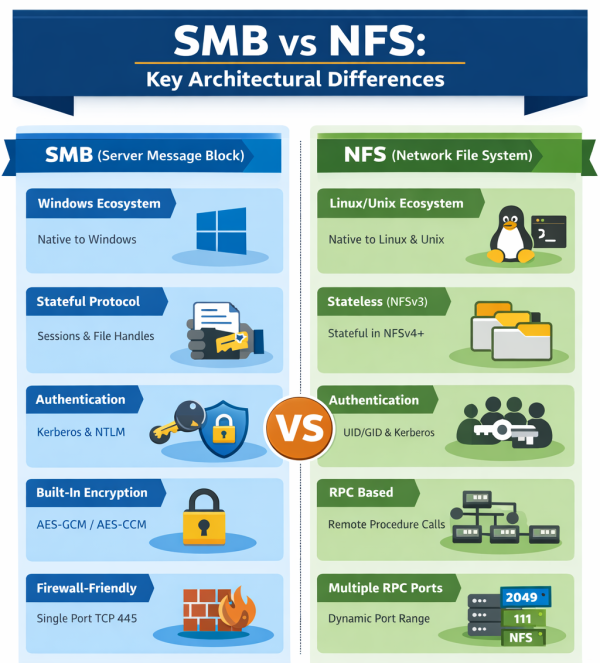
Network File System provides an alternative to CIFS for distributed file access. NFS originates from Unix environments rather than Windows. The protocol enjoys native support across Linux, Unix, and macOS systems.
Performance characteristics differ between protocols due to architectural decisions. NFS uses stateless operations in earlier versions, reducing server memory requirements. CIFS maintains session state, enabling features like file locking.
Security models diverge significantly between the protocols. CIFS authentication operates at user level with passwords validated against directory services. Traditional NFS trusted host systems to assert user identities.
Mixed-protocol environments support both NFS and CIFS access to shared storage simultaneously. This accommodates heterogeneous client populations without duplicating data. Permission mapping requires careful configuration.
Security Best Practices for CIFS Deployments
Disabling SMB 1.0 represents the most critical security improvement for CIFS environments. Legacy protocol support creates attack surfaces even when clients primarily use newer versions. Windows includes audit capabilities identifying SMB 1.0 usage.
SMB encryption should be mandatory for shares containing sensitive data. Server configuration options enable encryption requirements at share or server levels. Clients connecting to encrypted shares must support SMB 3.0 or later.
SMB signing prevents man-in-the-middle attacks modifying traffic between clients and servers. Windows domain controllers require signing by default. SHA-256 based signing in SMB 3.0 provides stronger integrity verification.
Network segmentation limits exposure of SMB services to authorized client populations. Firewall rules should block ports 139 and 445 from untrusted segments. Never expose SMB ports directly to internet connections.
Troubleshooting Common CIFS Issues
Protocol version mismatches cause connection failures when clients and servers lack common supported versions. Error messages referencing “STATUS_NOT_SUPPORTED” indicate negotiation problems. Adjusting minimum protocol versions typically resolves these issues.
Permission errors manifest as access denied messages despite apparently correct credentials. Verify share permissions allow the authenticating user access. Multi-layered permission models require both share-level and filesystem-level access grants.
Name resolution failures prevent connections using hostnames rather than IP addresses. DNS configuration or NetBIOS name service problems cause these issues. Testing with IP addresses isolates name resolution from connectivity problems.
Performance degradation often traces to network infrastructure rather than protocol configuration. Packet loss, high latency, or bandwidth constraints affect SMB operations disproportionately. Network monitoring tools help identify bottlenecks.
Cross-Platform CIFS Implementation
CIFS enables file and directory sharing across heterogeneous operating systems by providing a common network file access protocol. On Unix and Linux systems, CIFS/SMB server and client functionality allows interoperability with Windows-based environments and supports enterprise features such as centralized authentication and domain integration.
macOS includes built-in SMB client support for accessing CIFS shares and has standardized on SMB as its primary network file-sharing protocol. File services on macOS servers are exposed using SMB, enabling seamless cross-platform access between Apple and Windows systems.
Mobile platforms, including iOS and Android, access CIFS shares through native capabilities or third-party clients. On iOS, the Files application connects directly to SMB servers, enabling remote file access and integration with enterprise storage systems.
Visuality Systems specializes in SMB protocol implementations for embedded systems and Java-based applications. Its solutions enable CIFS/SMB connectivity on operating systems and platforms that do not provide native support, addressing cross-platform and embedded use cases.
The Future Beyond CIFS
Protocol evolution continues with SMB over QUIC, eliminating VPN requirements for secure remote file access. This technology uses TLS 1.3 encryption and certificate authentication. Windows Server 2022 introduced SMB over QUIC server capabilities.
Cloud integration changes file-sharing paradigms fundamentally. Hybrid storage solutions combine on-premises CIFS/SMB access with cloud-based synchronization. Azure Files provides SMB endpoints accessible from anywhere.
Continued security hardening addresses persistent threats targeting file-sharing protocols. Microsoft’s Secure Future Initiative includes mandatory SMB signing requirements. Organizations should track evolving security recommendations.
Modernize Your File-Sharing Infrastructure
CIFS served critical roles in enterprise computing for decades. The protocol’s evolution through successive SMB versions brought substantial improvements. Understanding this history helps IT professionals navigate current implementations.
Migration from legacy CIFS deployments to modern SMB implementations delivers measurable benefits. Auditing existing infrastructure identifies dependencies requiring attention. The investment in modernization reduces attack surface and improves user experience.
Organizations requiring specialized SMB solutions should consider purpose-built implementations. Visuality Systems delivers commercial SMB client and server libraries supporting SMB 3.1.1. Their YNQ embedded solutions, jNQ Java library, and NQ Storage server enable seamless file sharing across any operating environment. With over two decades of expertise and partnerships with Microsoft and NetApp, Visuality Systems provides reliable solutions. Visit our website to learn more.
FAQ
What is the difference between CIFS and SMB?
CIFS refers specifically to the SMB 1.0 protocol dialect Microsoft released in 1996. SMB is the broader protocol family including versions 1.0 through 3.1.1. Modern implementations use SMB 2.x or 3.x rather than the original CIFS specification.
Is CIFS still used today?
Legacy systems and older NAS devices may still rely on CIFS for compatibility. However, security vulnerabilities make continued usage risky. Modern environments should migrate to SMB 3.x for improved security and performance.
How do I enable CIFS on Windows Server?
Windows Server includes SMB file sharing by default through the Server role. Creating shares through Server Manager exposes resources via SMB automatically. SMB 1.0 requires explicit installation and should remain disabled.
What ports does CIFS use?
CIFS traditionally uses TCP ports 137, 138, 139 for NetBIOS-based connections. Modern SMB implementations prefer direct TCP connections on port 445. Firewall configurations should account for both port ranges.
Can Linux connect to Windows CIFS shares?
Linux systems connect to Windows shares using the cifs-utils package and mount.cifs utility. The kernel CIFS module supports SMB 2.x and 3.x protocols. Configuration through fstab enables persistent mounts.
Looking Ahead
Organizations that rely on SMB for data access, storage integration, or embedded systems often face similar architectural and operational challenges. A standards-compliant, well-supported SMB implementation can play a key role in addressing these challenges. If you are facing comparable requirements, contact Visuality Systems to discuss how our SMB protocol solutions can be integrated to support your specific technical and infrastructure needs.

Raphael Barki, Head of Marketing, Visuality Systems