
SMB over QUIC: Performance Benchmark

Is SMB over QUIC truly faster than traditional TCP? This performance benchmark explores the shift from SMB port 445 to UDP 443, how 0-RTT handshakes and superior packet loss handling redefine remote access for SMB shares. jNQ and YNQ bring this technology to all platforms.

SMB over QUIC revolutionizes file sharing by replacing TCP/445 with UDP/443, utilizing TLS 1.3 for secure, VPN-less access. This modern SMB share transport optimizes performance on unreliable networks. Solutions like Visuality Systems’ jNQ and YNQ extend this support across Linux, Android, and Java platforms, providing a robust SMB port alternative.

The Architectural Paradigm Shift from TCP to QUIC

The evolution of the Server Message Block (SMB) protocol reflects the broader history of networked communication, transitioning from the localized, trusted environments of the late 20th century to the globalized, untrusted landscape of the modern internet. For decades, the Transmission Control Protocol (TCP) served as the undisputed backbone for the SMB share, specifically utilizing the well-known SMB port 445. While TCP provided the necessary reliability and ordering required for file operations, its design constraints began to falter under the demands of cloud-scale services and mobile workforces.

Quick UDP Internet Connections (QUIC) as a transport layer for SMB represents one of the most significant advancements in file-sharing technology since the introduction of SMB 3.x. Unlike TCP, which manages reliability and congestion control within the operating system kernel, QUIC operates in user space on top of the User Datagram Protocol (UDP). This architectural distinction allows for faster iteration, improved security through integrated TLS 1.3, and a series of performance optimizations that directly address the “chatty” nature of the SMB protocol.
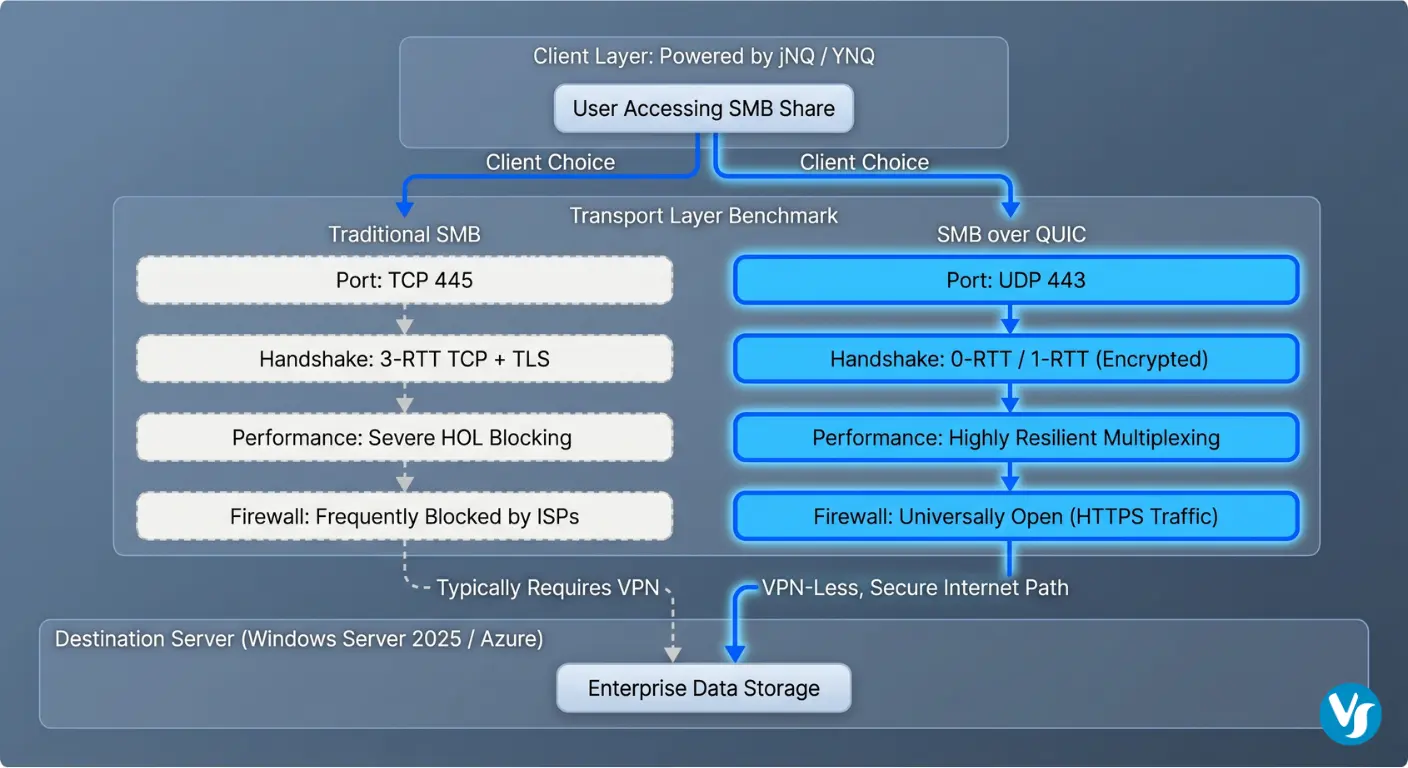
Technical diagram contrasting SMB over TCP vs. SMB over QUIC with jNQ and YNQ clients

The Structural Limitations of Legacy TCP/445

Traditional SMB connectivity relies on a rigid connection model. When a client initiates access to a remote SMB share, it must complete a sequential series of handshakes. The process begins with the TCP three-way handshake (SYN, SYN-ACK, ACK), followed by the negotiation of security layers such as TLS or NTLM/Kerberos. On high-latency connections, such as those found in satellite links or intercontinental mobile networks, these multiple round-trips result in significant delays before a single byte of file data is transferred.

Furthermore, the ubiquitous use of SMB port 445 has become a double-edged sword. While it provided a standardized point of entry, its historical association with vulnerabilities and malware propagation led many Internet Service Providers (ISPs) and enterprise firewall administrators to block port 445 by default. This restriction necessitated the deployment of complex and expensive Virtual Private Networks (VPNs) to bridge the gap between remote users and corporate file servers.

The Technical Foundation of the QUIC Protocol

QUIC disrupts the traditional transport model by merging the transport and cryptographic handshakes into a single process. By utilizing TLS 1.3 as a mandatory component, QUIC ensures that every packet, including the initial handshake, is encrypted and authenticated. This “always-on” encryption prevents protocol ossification, where middlebox devices like firewalls and routers interfere with traffic they do not recognize, because the contents are hidden within an encrypted tunnel.

The protocol’s reliance on UDP port 443 allows SMB traffic to masquerade as standard HTTPS traffic, which is almost universally allowed through firewalls and ISPs. This enables a true “VPN-less” experience, where the transport layer itself provides the security tunnel required for remote access.

Feature Comparison

Traditional SMB over TCP

Modern SMB over QUIC

Transport Layer

TCP (Connection-Oriented)

UDP (Connection-Oriented via User-Space)

Standard Port

SMB port 445

UDP/443 (SMB port alternative)

Security Layer

Optional SMB Encryption / Separate TLS

Mandatory TLS 1.3

Handshake Latency

3-4 Round Trips (TCP + TLS + SMB)

1 Round Trip (Combined)

Resumption

Requires Full Re-establishment

0-RTT (Zero Round Trip) Support

Connection ID

Based on 4-Tuple (IPs and Ports)

Unique Connection ID (Resistant to IP changes)

Performance Benchmarking: UDP/443 vs. TCP/445

The performance of an SMB share is often measured by three primary metrics:

  1. throughput (how much data can be moved)
  2. latency (how fast the initial request is fulfilled),
  3. resilience (how well the connection survives network fluctuations).


Benchmarking SMB over QUIC against traditional TCP reveals that while TCP may maintain a slight advantage in pristine, low-latency Local Area Networks (LAN), QUIC becomes the dominant transport as soon as network conditions become non-ideal.

Throughput Efficiency and Packet Loss Resilience

In a high-speed environment, such as a 10 Gbps link, the impact of packet loss on protocol performance can be significant. TCP utilizes a congestion control mechanism called Head-of-Line (HOL) blocking, where the loss of a single packet halts the entire stream of data.

Conversely, QUIC supports multiplexed streams and if a packet in one stream is lost, other streams can continue to deliver data independently. Lab tests indicated that specialized QUIC implementations can maintain nearly 80% of their throughput efficiency even under high-stress conditions with 10% packet loss.

Latency and Handshake Performance

The latency of an SMB share is critically impacted by the connection setup time. In scenarios where users are accessing files across continents with a Round Trip Time (RTT) of 200ms, a TCP-based connection might take 600ms or more just to initialize. QUIC reduces this to 200ms for the initial connection. For subsequent connections to the same server, QUIC utilizes session tickets to achieve 0-RTT resumption, where the client sends encrypted file requests in the very first packet, effectively reducing the handshake latency to nearly zero.

Benchmarking Hardware and Methodology

Professional-grade benchmarks, such as those performed on the MsQuic dashboard, utilize high-performance server hardware to evaluate raw protocol limits.

Metric

Windows Kernel (MsQuic)

Linux User-Space (MsQuic)

Upload Speed

6.61 Gbps

6.46 Gbps

Download Speed

7.13 Gbps

6.53 Gbps

Requests Per Second

1037 KHz

969 KHz

Handshakes Per Second

10.48 KHz

13.86 KHz

The data indicates that while Windows kernel optimizations provide a slight edge in raw throughput, user-space implementations on Linux are highly competitive and offer greater flexibility for rapid deployment and customization.

The Evolution of Server Support: Beyond Azure Edition

A significant milestone in the adoption of SMB over QUIC was the transition from a restricted “Azure-only” feature to a core component of the Windows Server ecosystem. Initially introduced in Windows Server 2022 Azure Edition, the feature was designed to provide a secure access path for cloud-resident workloads without the need for VPN gateways.

Expansion in Windows Server 2025

With the release of Windows Server 2025, Microsoft has expanded the availability of SMB over QUIC to the Datacenter and Standard editions. This strategic shift empowers organizations to deploy secure remote access on-premises, in hybrid environments, or within non-Azure public clouds. This expansion is a direct response to the increasing complexity of the threat environment and the need for a protocol that can traverse untrusted networks by default.

Deployment and Configuration Procedures

The configuration of an SMB over QUIC server requires the proper setup of a Public Key Infrastructure (PKI) to issue and manage TLS 1.3 certificates. The server certificate must include the Fully Qualified Domain Name (FQDN) of the server and be trusted by the client devices.

Administrators can enable the feature using the following PowerShell command to map the certificate thumbprint to the SMB server:

New-SmbServerCertificateMapping -Name "server.domain.com" -ThumbPrint "CERT_THUMBPRINT_HERE" -StoreName My

This mapping ensures that when a client attempts to connect via UDP/443, the server presents the correct cryptographic identity to establish the secure tunnel. Clients running Windows 11 can then map the SMB share using the `/transport:QUIC` flag:

net use Z: \\server.domain.com\share /transport:QUIC

Visuality Systems: Enabling Cross-Platform SMB over QUIC

While Microsoft’s native support is robust, it is primarily focused on the Windows ecosystem. This creates a gap for organizations that rely on Linux servers, Android mobile devices, or specialized Java applications. Visuality Systems addresses this challenge through its jNQ and YNQ products, which feature a dedicated SMB over QUIC support and add-on.

jNQ: The Java SMB Library with QUIC Support

jNQ is a pure Java SMB3.1.1 client library designed as a modern replacement for the aging JCIFS library. It provides full support for the latest SMB dialects and security features, including AES-256-GCM encryption and Kerberos authentication. The jNQ with the QUIC add-on extends these capabilities to any platform that supports Java, including Linux, Android, and macOS.

The implementation of jNQ is highly asynchronous and multi-threaded, allowing for high-performance I/O operations such as reading and writing to multiple file shares simultaneously. Because it is written in pure Java, it eliminates the need for the Java Native Interface (JNI) and third-party libraries, simplifying integration into enterprise applications.

YNQ: Embedded and IoT Connectivity

For embedded systems and the Internet of Things (IoT), Visuality Systems offers YNQ, a C-language SMB client and server SDK. YNQ is optimized for a minimal resource footprint, making it suitable for devices with limited RAM and ROM, such as printers, medical scanners, and industrial controllers.

The YNQ QUIC add-on (available for Linux and other operating systems) is based on the Microsoft open-source MsQuic library. This integration allows embedded devices to remotely browse SMB share folders and perform file operations over the internet without the overhead of a traditional VPN.

Advanced Security: Client Access Control and Kerberos

The security of an SMB share is not solely dependent on encryption; authentication and authorization are equally critical. SMB over QUIC enhances these components through Client Access Control (CAC) and support for Kerberos over the internet.

Certificate-Based Client Access Control

By default, any client that trusts the server’s certificate can attempt to connect to an SMB over QUIC server. To provide more granular security, administrators can implement Client Access Control. This feature allows the definition of allow- and block-lists based on client-side certificates.

The process involves identifying the SHA-256 hash of a client certificate and registering it with the SMB server. This ensures that only authorized devices can establish a connection, providing an additional layer of protection that is independent of user credentials.

KDC Proxy and Kerberos Authentication

In a traditional corporate network, Kerberos authentication requires a direct line of sight to a Domain Controller. Over the internet, this would typically require a VPN. SMB over QUIC overcomes this by utilizing a Kerberos Key Distribution Center (KDC) Proxy.

The KDC Proxy service allows clients to obtain Kerberos tickets over HTTPS (port 443), which are then used to authenticate to the SMB server over QUIC. This ensures that organizations can move away from legacy and insecure NTLM authentication even for remote users, maintaining a unified security model across the entire enterprise.

Implementation Strategy: Migration and Best Practices

Transitioning to SMB over QUIC requires careful planning to ensure compatibility and performance. The following best practices are derived from successful enterprise deployments and protocol experts.

Firewall and Port Management

While SMB over QUIC uses UDP/443 by default, the new alternative ports feature in Windows Server 2025 allows for customization. However, the use of non-standard ports may interfere with firewall traversal. A critical security recommendation is to disable inbound TCP port 445 on the internet-facing interface of the file server, as this legacy SMB port is a frequent target for automated scanning and exploit attempts.

Certificate Lifecycle Management

The reliability of the protocol is tethered to the validity of the TLS certificates. Expired certificates will result in immediate loss of connectivity for all remote clients. Organizations should implement automated renewal processes and monitor certificate health through management tools like Windows Admin Center (WAC).

Performance Tuning for High-Bandwidth Networks

For organizations utilizing 25Gbps or 100Gbps networking, the CPU can become a bottleneck for QUIC due to the overhead of user-space packet processing and encryption. To mitigate this, Windows Server 2022 and 2025 include several UDP data path improvements, such as:

  • UDP Segmentation Offload (USO): Offloads the segmentation of large UDP packets to the network adapter.
  • UDP Receive Side Scaling (RSS): Distributes incoming UDP traffic across multiple CPU cores.
  • Hardware-Offloaded Security: High-performance systems can offload the AES-GCM encryption and decryption required for TLS 1.3 to the network interface card or a dedicated crypto-processor.

The Future Outlook: 5G, IoT, and Beyond

The potential for SMB over QUIC extends far beyond simple remote file access. The protocol’s characteristics make it an ideal candidate for several emerging technological trends.

5G and Mobile Connectivity

The low latency and connection migration capabilities of QUIC are perfectly aligned with the rollout of 5G networks. In a 5G environment, where high throughput and low latency are expected, QUIC ensures that the transport protocol does not become the weak link in the chain. This is particularly relevant for applications like mobile CAD/CAM, high-definition video editing in the field, and cloud gaming.

IoT and Autonomous Systems

In the realm of autonomous vehicles and smart cities, devices must maintain reliable connections while moving through different network zones. The ability of SMB over QUIC to handle IP address changes seamlessly, without dropping the session, is critical for telemetry and data logging in high-stakes environments like autonomous driving and telehealth.

CISA and Global Security Initiatives

The Cybersecurity and Infrastructure Security Agency (CISA) has placed a strong emphasis on modernizing protocol usage to combat ransomware. By recommending SMB over QUIC, CISA is driving a global shift toward “secure by default” transport layers. As more organizations adopt this technology, the global footprint of vulnerable SMB port 445 exposures is expected to decline significantly.

Conclusion: The New Standard for Enterprise File Sharing

The shift from TCP to QUIC represents a maturation of the SMB protocol for the modern internet. By integrating mandatory encryption, reducing handshake latency, and providing unprecedented resilience to packet loss and network migration, SMB over QUIC addresses the fundamental limitations of traditional file sharing. The broadening of server support to the standard editions of Windows Server 2025, coupled with the cross-platform enablement provided by Visuality Systems’ jNQ and YNQ solutions, makes this technology accessible to every segment of the IT industry.

Organizations looking to enhance their security posture, improve remote user experience, and prepare for the demands of 5G and IoT should prioritize the deployment of SMB over QUIC. As the industry moves away from legacy SMB port 445 and toward encrypted, firewall-friendly transports, SMB over QUIC is poised to become the de facto standard for secure data access across the globe.

Contact Visuality Systems to learn how we can help your organization transition to the future of file sharing. Our SMB protocol experts provide the libraries and support needed to integrate SMB over QUIC into any application or environment.

Lilia Wasserman, VP R&D, Visuality Systems

Lilia Wasserman, VP R&D, Visuality Systems

Share Via
Related Articles

Visuality systems uses technical, analytical, marketing, and other cookies. These files are necessary to ensure smooth operation of Voltabelting.com site and services and help us remember you and your settings. For details, please read our Privacy policy

Skip to content