
SMB Client and Server Roles, Use Cases, Security Risks, and Best Practices
The Server Message Block protocol, commonly referred to as SMB, is the standard for network file and resource sharing in enterprise and embedded environments. Originally developed by Microsoft, SMB enables applications and users to access files, printers, and other resources across local networks and over WAN connections.
Understanding the distinct roles of the SMB client and SMB server is essential for architects, developers, and security professionals designing secure and reliable systems.
What Is an SMB Client?
An SMB client is the component that initiates communication. It connects to a remote SMB server to access shared resources.
Core Responsibilities
- Establish a TCP or QUIC transport connection
- Negotiate SMB dialect, typically SMB 2.x or 3.x
- Authenticate using NTLM (deprecated and insecure) or Kerberos (preferred)
- Access remote shares and perform file operations
- Maintain session state and handle reconnection logic
Typical Use Cases
- Windows, Linux, or macOS systems mounting shared folders
- Embedded devices uploading logs to centralized storage
- Enterprise applications accessing file repositories
- Backup agents storing data on network storage
- Cloud workloads accessing on premises file servers
Operating systems such as Windows, Linux, and macOS include built-in SMB clients, enabling remote SMB shares to be mounted as part of the local file system. For Linux and Unix systems, open source implementations are commonly used, while many OEMs and ISVs integrate commercial SMB client libraries to ensure predictable behavior and long term maintenance.
What Is an SMB Server?
An SMB server listens for incoming connections and exposes shared resources.
Core Responsibilities
- Listen on TCP (port 445) or via SMB over QUIC (port 443 or alternative ports)
- Negotiate protocol capabilities
- Authenticate and authorize users
- Enforce share and file level permissions
- Manage concurrent sessions and locking
- Ensure data integrity and consistency
Typical Use Cases
- File servers in enterprise domains
- NAS appliances
- Printer storage systems
- Industrial gateways
- Embedded storage solutions
- Cloud based file services
Windows Server includes a native SMB server implementation, and Linux systems often rely on open source SMB server stacks. In embedded and appliance environments, vendors typically integrate an SMB server SDK into their firmware or storage platform.
SMB Client vs SMB Server: Key Differences
Aspect | SMB Client | SMB Server |
|---|---|---|
Initiates connection | Yes | No |
Hosts shared resources | No | Yes |
Performs authentication | Authenticates to server | Validates credentials |
Handles concurrency | Manages local requests | Manages multiple remote sessions |
Typical deployment | Endpoints, apps, devices | File servers, storage systems |
In practice, the SMB client is responsible for session establishment, authentication initiation, and managing its use of credits, while the SMB server validates credentials, enforces file locking semantics, and uses the credits mechanism to regulate request load and manage concurrency.
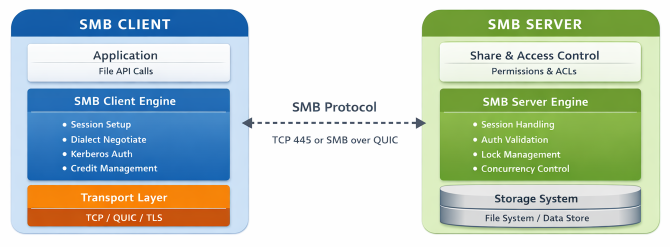
In many real world deployments, a single device performs both SMB client and SMB server roles. For example, a gateway appliance may retrieve configuration data from a central file server while simultaneously exposing local storage to downstream systems. In such architectures, client and server roles are independent and must be secured, configured, and tested separately.
Security Risks in SMB Deployments
Because SMB operates at the core of enterprise file access, misconfiguration can introduce significant risk.
1. NTLM Weaknesses
NTLM authentication is susceptible to relay and brute force attacks if not properly restricted. Modern environments increasingly block NTLM (disabled by default) in favor of Kerberos.
2. Lack of Encryption
Older SMB versions like SMB1 transmit data without encryption, exposing sensitive data to interception.
3. Misconfigured Permissions
Overly permissive shares allow unauthorized data access or lateral movement.
4. SMB Signing Disabled
Without SMB signing, attackers may manipulate traffic via man-in-the-middle (MitM) techniques.
5. Legacy Protocol Versions
SMB 1.0 is deprecated and should never be enabled in production environments.
Secure Connections: Best Practices
Use SMB 3.x with Encryption
SMB 3.x supports AES-based encryption and integrity protection. Encryption can be enforced per share or globally.
Prefer Kerberos Over NTLM
Kerberos provides mutual authentication and stronger security properties within domain environments.
Enable SMB Signing
Signing prevents tampering and replay attacks.
Implement Least Privilege
Grant minimal share and file permissions required for operation.
Consider SMB Over QUIC
SMB over QUIC encapsulates SMB traffic inside TLS 1.3 over UDP, eliminating the need to expose TCP 445 externally and significantly reducing attack surface. This is especially relevant for hybrid and cloud connected scenarios.
Common SMB Issues and Recommended Workarounds
Issue | Typical Root Causes | Impact | Recommended Workarounds |
Authentication Failures | SPN misconfiguration, DNS resolution errors, domain trust issues, clock skew, Kerberos ticket problems | Users cannot access shares, fallback to weaker authentication (e.g., NTLM), repeated login prompts | Verify DNS and domain join status, ensure proper SPN registration, synchronize system clocks, validate Kerberos ticket acquisition before allowing NTLM fallback |
NTLM Blocking Issues | Domain policy disables NTLM, legacy systems still depend on NTLM | Access failures in mixed or legacy environments | Migrate to Kerberos authentication, validate SPNs, test authentication paths before enforcing NTLM blocking policies |
Performance Bottlenecks | High network latency, insufficient SMB credits, lack of multichannel, disabled large Maximum Transmission Unit (MTU), inefficient I/O patterns | Slow file transfers, application delays, timeouts | Enable SMB Multichannel where supported, tune credit handling, optimize I/O size, ensure adequate network bandwidth and low latency paths |
Encryption Overhead | Mandatory SMB encryption on low power devices, lack of hardware acceleration | Reduced throughput, higher CPU usage | Use AES hardware acceleration where available, apply encryption selectively per share, validate CPU capacity during design phase |
File Locking Conflicts | Improper share modes, concurrent file access, stale durable handles | Application errors, file corruption risks | Implement correct locking semantics, use durable or persistent handles appropriately, validate client behavior under concurrency scenarios |
Dialect Negotiation Failures | Mismatch in supported SMB versions, disabled SMB 2.x or 3.x on one side | Connection refused or downgraded protocol | Ensure SMB 3.x support is enabled, disable SMB 1.0 entirely, validate dialect negotiation in packet traces |
Interoperability Issues | Partial SMB 3.x feature implementation, differences in protocol interpretation, inconsistent handling of edge cases | Unexpected disconnects, feature incompatibility | Perform cross platform interoperability testing, validate feature negotiation, analyze packet captures during session setup |
Permission Misconfiguration | Overly broad share permissions, inconsistent New Technology File System (NTFS) and share level Access Control Lists (ACLs) | Unauthorized access or unexpected access denial | Apply least privilege principle, align file system ACLs with share permissions, conduct periodic access audits |
Connection Drops Over WAN | Network instability, aggressive firewall timeouts, missing keep alive settings | Session termination, data transfer interruption | Enable keep alive mechanisms, configure firewall session timeouts appropriately, use persistent handles, consider SMB over QUIC for WAN scenarios |
SMB Signing Disabled | Performance concerns, legacy configurations | Exposure to MitM attacks | Enforce SMB signing via policy, validate signing negotiation during session setup |
SMB in Embedded and Cross Platform Environments
Integrating SMB into non-Windows systems presents architectural and maintenance challenges. While open source implementations are widely available, organizations building commercial products often require:
- Deterministic performance
- Long term maintenance
- Security patch management
- Dedicated technical support
- Certification readiness
Commercial SMB client and server libraries are frequently embedded into printers, storage appliances, and industrial systems where reliability and security are mission critical.
How Visuality Systems Supports SMB Implementations
Visuality Systems provides commercial SMB protocol libraries designed for integration into enterprise, embedded, and storage platforms.
- YNQ – C-language SMB client and server SDK for embedded and storage systems
- jNQ – Java-based SMB client library for enterprise applications
These solutions support modern SMB 3.x capabilities including encryption, signing, Kerberos authentication, clustering support, and integration flexibility across operating systems.
For organizations that need full control over their SMB stack while maintaining enterprise grade security and support, commercial SMB components can reduce risk and accelerate time to market.
Conclusion
The SMB client and SMB server serve complementary but distinct roles in networked file sharing architectures. While the client initiates connections and consumes remote resources, the server exposes shares and enforces authentication and authorization policies. In modern deployments, a single system may perform both roles, increasing architectural and security complexity.
Secure configuration is essential. Enforcing SMB 3.x, preferring Kerberos over NTLM, enabling signing and encryption, and validating interoperability across platforms are critical to maintaining performance, integrity, and reduced attack surface.
Whether you are deploying enterprise file infrastructure, building an embedded device, or integrating SMB into a commercial product, careful protocol implementation and testing directly impact reliability and long term maintainability.
Need to integrate or modernize an SMB client or server stack?
Explore how Visuality Systems commercial SMB libraries can support secure, standards-compliant implementations across embedded, storage, and enterprise environments. Contact our team to discuss your specific architecture and security requirements.

Raphael Barki, Head of Marketing, Visuality Systems