
What Is SMB? An Enterprise Guide to Licensing, Security, and Compliance for IT Decision Makers

An enterprise evaluation guide to the SMB protocol for IT decision-makers and system architects. Legal, financial, and compliance trade-offs of network file sharing, including TCO, GPLv3 copyleft risks, and Microsoft IP patent liabilities of open-source vs commercially licensed middleware.

What is SMB?

SMB is a network file and resource sharing protocol that uses a client-server model. SMB clients such as PCs on a network connect to SMB servers to access resources such as files and directories or perform tasks like printing over the network.
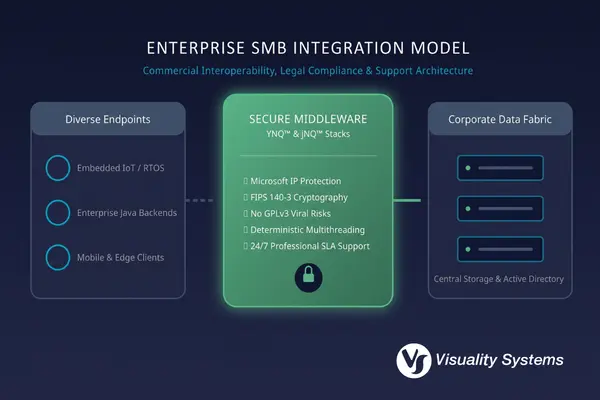
Abstract B2B architectural map of enterprise SMB middleware integration, showing how secure, non-GPL, and Microsoft-licensed client/server stacks connect diverse edge devices, Java backends, and mobile platforms securely to centralized corporate storage arrays.

Often, the term CIFS, short for Common Internet File System, is used interchangeably with Server Message Block. That is because CIFS was a popular Microsoft SMB implementation introduced with Windows 95. Since then, the informal use of CIFS to refer to SMB has remained common.
How SMB Operates in Enterprise Infrastructure

Server Message Block (SMB) operates on a highly secure client-server model to facilitate seamless network file sharing, printing services, and inter-process communication across local, hybrid, and cloud networks. Rather than transferring entire file payloads over the network, SMB dynamically processes I/O requests and metadata, optimizing network bandwidth and allowing real-time collaboration on files without local storage overhead.

  • The SMB Client (Enterprise Endpoints): Any workstation, application container, or non-Windows edge device (such as an IoT sensor, mobile platform, or Java-based billing service) acting as a client initiates sessions, negotiates dialect capabilities, handles authentication, and mounts remote shares to interact with network assets natively.
  • The SMB Server (Centralized Resource Hub): The server, or clustered enterprise storage array, acts as the single source of truth. It manages concurrent sessions, validates authentication requests against Active Directory, enforces granular file-locking semantics (via opportunistic locks), and safely executes remote file read/write operations.
  • Network Shares and Ports (Infrastructure Pipelines): Shared resources (shares) are exposed securely over standard TCP port 445 or encapsulated via SMB over QUIC on port 443, bypassing legacy NetBIOS port 139 vulnerabilities to allow fast, direct hosting over untrusted public networks without the latency of a VPN.


💡 Technical Deep-Dive: For a detailed, packet-level breakdown of port mechanics, transport layers, and registry configurations, consult our technical guide.

Evaluating SMB Versions: Business and Integration Milestones

For IT decision-makers, evaluating Server Message Block (SMB) versions is not a theoretical exercise in protocol history; it is a critical calculation of business risk, product compliance, and system compatibility. Deploying or maintaining unencrypted legacy versions like SMB 1.0 (historically referred to as CIFS) introduces severe organizational liabilities. Beyond its massive network overhead (“chattiness”), SMB1 lacks basic transport security, making it the primary entry point for devastating ransomware campaigns such as WannaCry and NotPetya.

In modern enterprise deployments and regulated B2B environments, restricting communication strictly to modern secure dialects (SMB 3.0 through 3.1.1) is a prerequisite for security compliance frameworks (like FIPS 140-3, NIS2, and HIPAA) . While standard desktop operating systems natively negotiate these dialects, integrating secure, compliant file-sharing into custom Java enterprise backend tools or resource-constrained embedded systems (such as medical devices, HMI panels, and IoT endpoints) requires lightweight, professionally designed middleware to bypass performance caps and prevent intellectual property exposure .

💡 Technical Specifications: For an exhaustive, packet-level specifications guide comparing hexadecimal codes, buffer capabilities, and registry settings for every dialect from SMB 1.0 to 3.1.1, please consult our SMB Protocol Technical Guide.

Securing SMB: Enterprise Risk and Liability Hardening

From a pure cybersecurity standpoint, modern implementations of the SMB protocol (such as SMB 3.1.1) are exceptionally secure. However, for commercial enterprises, true network security extends beyond encryption algorithms like AES-256-GCM. It directly encompasses the legal and operational stability of your chosen software stack. Relying on community-maintained, open-source libraries can expose your organization to unpatched vulnerabilities, unpredictable support lag during active breaches, and, most critically, patent litigation, as open-source projects do not include patent indemnification.

Hardening your network file sharing infrastructure requires an active, multi-layered transition to modern standards: deprecating outdated NTLM challenge-response mechanisms in favor of mutual Kerberos authentication, enforcing mandatory packet-level signing, and encapsulating traffic via SMB over QUIC for secure VPN-less public network access. Implementing a commercially licensed SMB stack ensures your products are natively secure, continuously updated to align with Microsoft’s security roadmap, and legally protected by bundled Microsoft SMB IP and patent licensing.

💡 Technical Specifications: For a detailed, step-by-step walkthrough of Kerberos delegation, NTLM blocking, and firewall configuration rules, explore our comprehensive SMB Protocol guide.

Get a trial version
Get a Trial Version

Aligning SMB Capabilities with Business Objectives

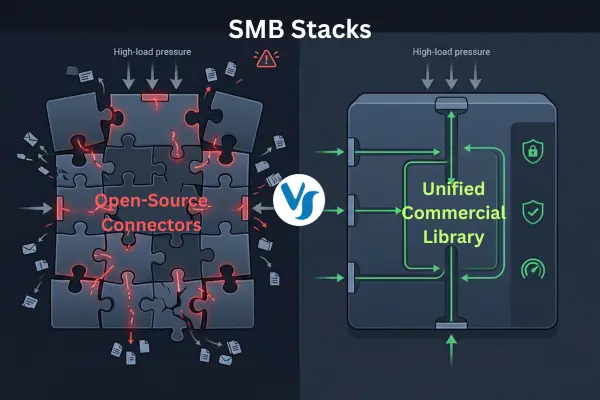
Enterprise-grade network sharing relies on four essential capabilities: robust identity verification, secure data-in-transit encryption, optimized throughput performance, and continuous failover reliability. Together, these features prevent database bottlenecks, file corruption, and expensive system downtime. However, many unoptimized or legacy open-source implementations rely on a heavy “process-per-client” execution model. This model caps throughput, creates severe CPU and memory bottlenecks at scale, and fails on constrained real-time operating systems (RTOS).

To maximize efficiency and support mission-critical enterprise workloads, commercial backends must leverage advanced transport optimizations. Stacks engineered with “Zero-Copy” payloads, multithreaded I/O execution, and thread-pool memory management dramatically reduce network traffic and CPU load. These performance enhancements ensure your system remains stable under extreme concurrent access, preventing the unpredictable performance lags and variable compute costs (“Token Shock”) associated with unoptimized virtual environments.

💡 Technical Specifications: To read a detailed technical analysis of opportunistic locking (oplocks), persistent handles, transparent failover, and multi-channel throughput, see our SMB Protocol Guide.

Finding the Right SMB Client and Server Software

Finding the right SMB client and server software for your application will depend on your deployment model. Embedded systems and IoT devices have different requirements than data centers or corporate networks. However, there are several key factors to consider that apply across the board. Let’s take a look at two SMB software alternatives – open source vs commercial – and see how they stack up against one another.

Open-Source and Commercial SMB: Aligning Implementations with Enterprise Requirements

When engineering teams plan to integrate Server Message Block (SMB) capabilities into corporate infrastructures or commercial products, open-source solutions are frequently the starting point. For standard Linux-based server deployments, Samba is the widely recognized community standard, while legacy Java backends have traditionally relied on JCIFS.

However, as an organization graduates to proprietary product launches, real-time operating systems (RTOS), or modern Java LTS (Java 17/21) microservices, the operational boundaries of community-maintained software become a critical strategic consideration. Upgrading your architecture to commercial, fully supported middleware like Visuality Systems’ YNQ (for embedded C) or jNQ (the premier Java JCIFS alternative) ensures native compatibility with modern security mandates like mandatory SMB signing, without the complexities of GPLv3 “copyleft” compliance or the overhead of self-managed code maintenance.

See Why Global Enterprises Graduated from Open-Source SMB

Are you evaluating the true total cost of ownership between community-supported software and commercial middleware? Watch this brief 2.5-minute video to hear directly from CTOs and R&D Directors at companies like Seeburger and Ohalo. Learn how replacing unmaintained, unsecure open-source clients with Visuality Systems’ fully licensed stacks resolved critical performance bottlenecks, eliminated GPLv3 compliance risks, and delivered up to a 10x boost in transfer speeds.

SMB Licensing & Compliance Matrix

Evaluation Criteria

Open Source (Samba, JCIFS, etc.)

Visuality Systems Stacks (YNQ / jNQ)

Licensing Framework

GPLv3 / LGPL “Copyleft” (viral source code exposure risk)

Commercial, OEM-friendly non-GPL license

Microsoft IP Protection

None; end-user assumes all patent infringement risks

Bundled, official Microsoft SMB IP licensing

Architecture & Performance

Process-per-client model (heavy memory overhead and bottlenecks at scale)

Lightweight, multithreaded “Zero-Copy” architecture

Support & Maintenance

Unpredictable community mailing lists and longer resolution times

24/7 Professional Help Desk with direct core engineer access

Compliance Readiness

Manual hardening required; lacks native government-grade certifications

Out-of-the-box FIPS 140-3 architecture readiness

Portability and Flexibility

Samba is supported across a variety of *nix operating systems. In addition to strong Linux and Unix support, Visuality Systems supports a wide variety of other platforms including Windows, iOS, Java platforms, and real-time operating systems (RTOS) such as ThreadX and VxWorks. Further, Visuality Systems takes a customer-driven approach to developing new on-demand features, making their Server Message Block solutions the most flexible on the market.

Licensing

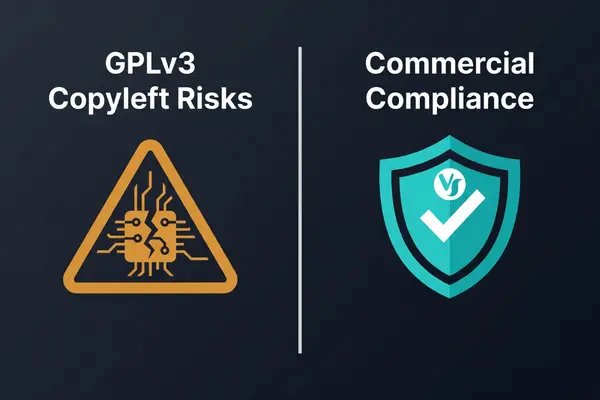
Samba uses a “copyleft” license (GPL v3) that can create licensing conflicts and legal issues in commercial products. Visuality Systems offers OEM-friendly commercial licensing and SMB Microsoft Patents included in the license agreement (no need to contact Microsoft!).

Vendor Support

Users in need of commercial support for Samba must contract with a 3rd party vendor. Visuality Systems supports their SMB software directly via an online helpdesk.

Tal Widerman, CEO, Visuality Systems

Tal Widerman, CEO, Visuality Systems

Share Via
Related Articles

Visuality systems uses technical, analytical, marketing, and other cookies. These files are necessary to ensure smooth operation of Voltabelting.com site and services and help us remember you and your settings. For details, please read our Privacy policy

Skip to content