
In the world of cybersecurity, a “patch” is often viewed as a finish line. However, as the recent discovery of CVE-2026-32202 proves, sometimes a patch is merely a hurdle that sophisticated threat actors like Fancy Bear (APT28) know exactly how to jump.
Last February, Microsoft addressed a critical remote code execution (RCE) vulnerability (CVE-2026-21510) involving malicious LNK (shortcut) files. The security world breathed a sigh of relief. But the relief was short-lived. Security researchers at Akamai recently discovered that the fix was incomplete. While it blocked the execution of malicious code, it left a “zero-click” door wide open—one that allows attackers to steal credentials without the user ever clicking a file.
The Anatomy of a Zero-Click Coercion
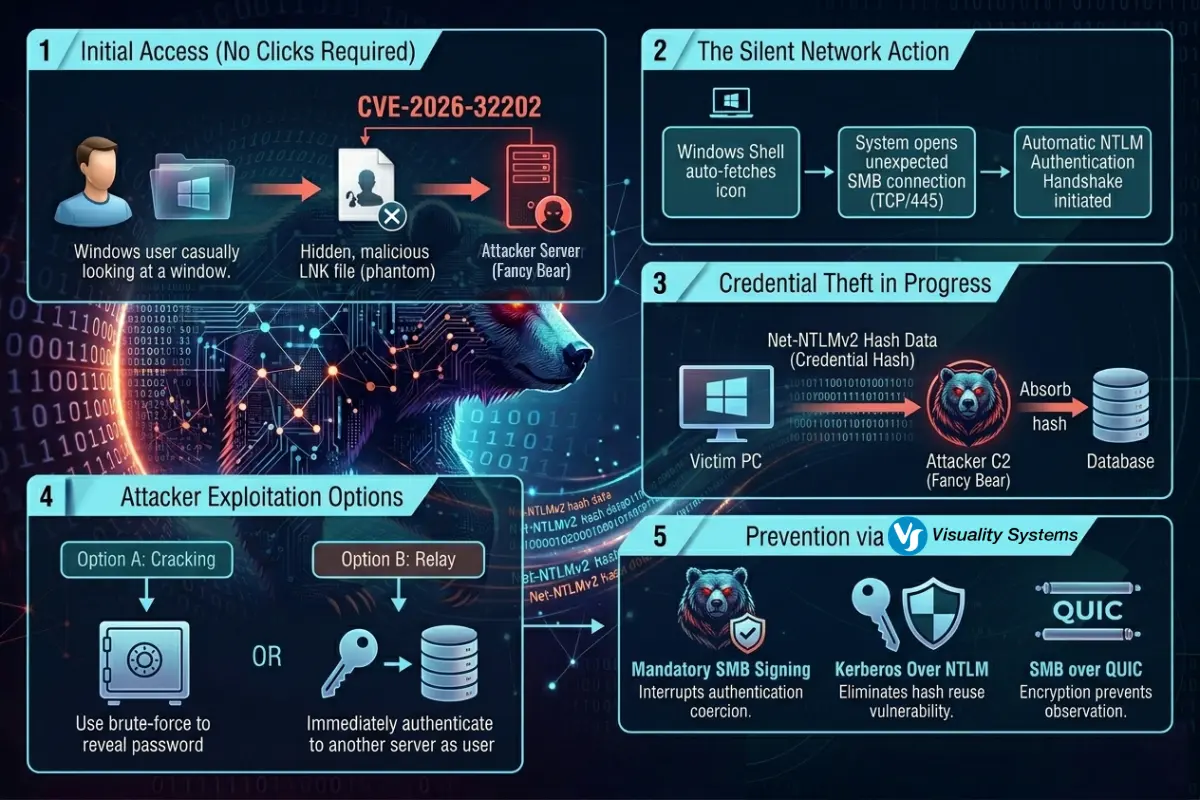
At the heart of this issue is how the Windows Shell processes files. Imagine you download a folder containing a specially crafted LNK file. You don’t open the file; you simply open the folder in Windows Explorer to see what’s inside.
To display the file properly, Windows Explorer tries to fetch an icon. If that icon path points to a remote server (a UNC path), Windows automatically initiates a Server Message Block (SMB) connection to that server.
This is where the trap is sprung. The moment your system connects via SMB to the attacker’s server, it triggers an automatic NTLM authentication handshake. Your system dutifully hands over its Net-NTLMv2 hash. The attacker, waiting on the other side, can now:
- Crack the hash offline to retrieve your plaintext password.
- Relay the hash to another service in your network to impersonate you.
This is a classic “authentication coercion” attack. It requires zero interaction from the user beyond just viewing a folder, making it a favorite for groups like Fancy Bear (MITRE G0007), who specialize in stealthy credential theft.
Why SMB Vulnerabilities Keep Occurring
The recurring theme in these vulnerabilities (from the server-side devastation of EternalBlue to this latest Shell spoofing flaw on the client side) is the inherent risk of the monolithic Windows SMB stack. Because the Windows SMB stack is deeply integrated into the OS kernel and tied to legacy authentication protocols like NTLM, it often prioritizes “seamless connectivity” over “strict security.”
Microsoft has released updates to address this (see the Microsoft Advisory for CVE-2026-32202), but for many organizations, the “patch-and-pray” cycle is too slow and too risky.
Prevention Beyond the Patch: The Visuality Systems Advantage
At Visuality Systems, we’ve long advocated for a different approach: Protocol-level hardening. Our SMB libraries (YNQ and jNQ) are engineered to provide a secure, high-performance implementation of the Microsoft SMB protocol for non-Windows platforms. By following a security-first design, our libraries allow embedded systems, Java applications, and non-Windows devices to interact seamlessly and safely with Windows environments. Here is how our solutions protect your digital assets even when the OS itself is vulnerable:
- No Dependence on Windows Shell: Our libraries operate independently of the Windows Shell and explorer.exe. They do not “auto-fetch” icons or parse LNK files in a way that triggers unauthorized outbound connections.
- Mandatory SMB Signing: One of the most effective ways to stop NTLM relay attacks is SMB Signing. While Windows often treats this as an optional setting, our libraries can enforce SMB Signing by design, ensuring that every message is cryptographically verified and cannot be intercepted or spoofed.
- NTLM Blocking & Kerberos Priority: As we’ve detailed in our SMB Security Tutorial, the best way to prevent hash theft is to stop using NTLM entirely. Our solutions support advanced NTLM blocking and prioritize Kerberos authentication, which provides mutual authentication and is not susceptible to the same relay attacks.
SMB over QUIC: For remote workers, we offer SMB over QUIC, which wraps SMB traffic in a TLS 1.3 encrypted tunnel. This eliminates the need for exposed TCP 445 ports and provides a Zero Trust foundation for file sharing.
The Bottom Line
CVE-2026-32202 is a reminder that even “invisible” system actions can have visible consequences. While Microsoft continues to secure the Windows desktop, Visuality Systems ensures that your non-Windows assets and enterprise applications follow the same rigorous security standards.
If you want to protect your digital assets, use our solutions and let us help you implement the due measures to prevent costly and unpleasant incidents. Don’t wait for the next “incomplete patch,” secure your communication at the protocol level today.
Explore our resources to learn more:
Lilia Wasserman, VP R&D, Visuality Systems