


Kerberos Authentication with Azure Files

Not all Kerberos configurations are created equal. Discover why Microsoft Entra Kerberos requires specialized SMB client support, how session signing impacts FIPS/NIS2 compliance, and how YNQ provides a platform-independent solution for complex Azure Files integrations.

When integrating applications with Azure Files, choosing the right authentication configuration is more than a deployment detail, it defines your security architecture. While Azure Files supports three distinct Kerberos configurations, they are not functionally equivalent. The authentication flow, infrastructure requirements, and what an SMB client needs to implement differ significantly across them. Understanding the differences matters whether you are evaluating an SMB client library, planning an infrastructure deployment, or implementing SMB client support for Azure Files yourself.

The Three Configurations

Configuration

Identity Provider

KDC

1. Microsoft Entra Kerberos

Entra ID (cloud-only)

kerberos.microsoftonline.com

2. AD DS

On-premises Active Directory

On-premises DC

3. Microsoft Entra Domain Services

Managed domain (Azure)

Managed Domain Controller

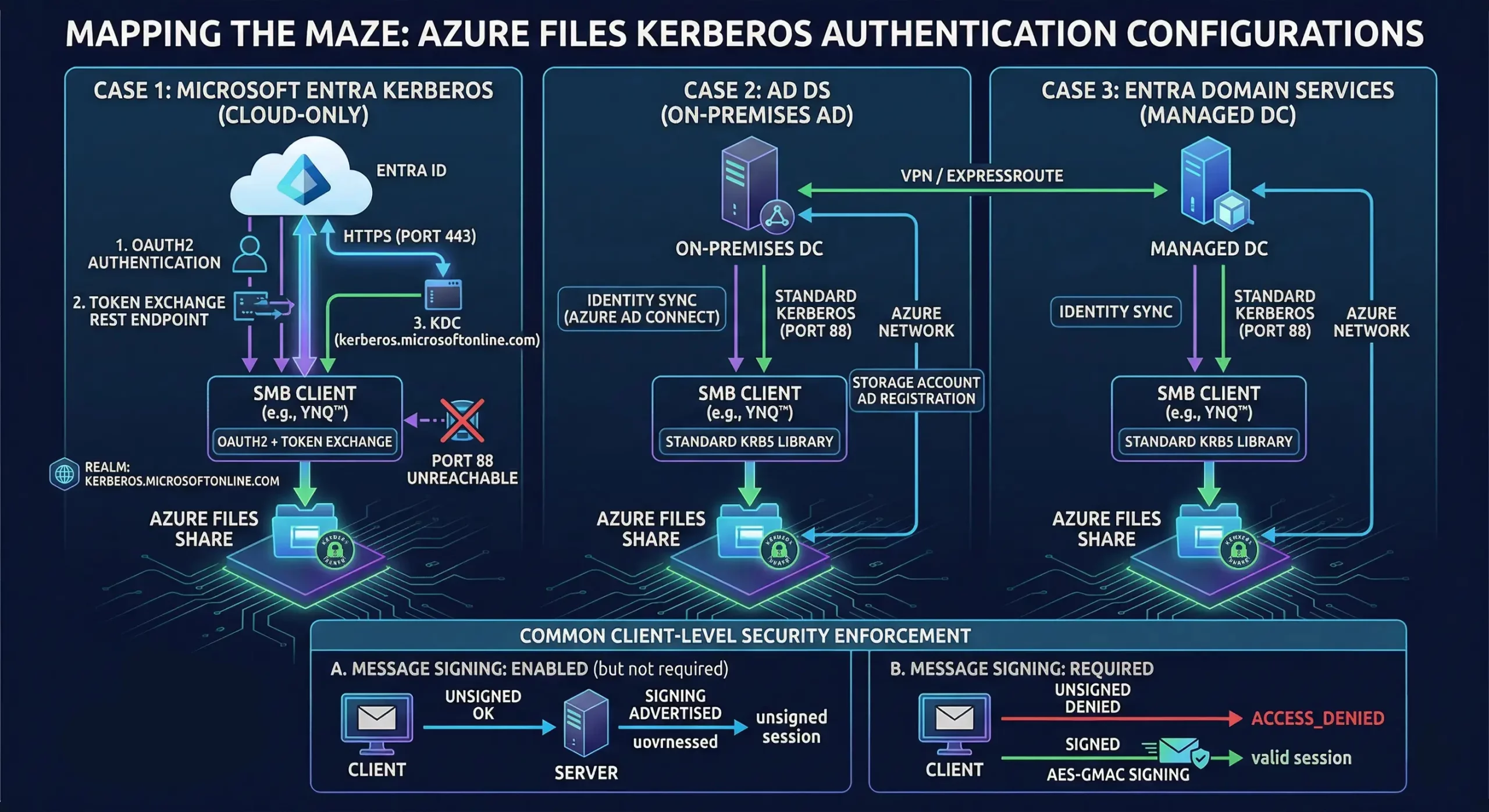
Technical diagram showing three Azure Files Kerberos configurations: Cloud-only Entra ID, On-premises AD, and Managed DC, with SMB signing logic.
Azure Files Kerberos authentication: Cloud-only Entra ID, On-premises AD, and Managed DC, with SMB signing.

Cases 2 and 3: Standard Kerberos Applies

In both AD DS and Microsoft Entra Domain Services configurations, a traditional domain controller is present. The authentication flow is standard Kerberos: the client sends an AS-REQ to the DC on port 88, receives a Ticket Granting Ticket (TGT), and exchanges it for a service ticket to access Azure Files. Any SMB client with a working Kerberos implementation should handle this without modification.

The prerequisites are on the infrastructure side:

  • Identity sync: Azure AD Connect must synchronize on-premises AD users to Entra ID so the same identity is recognized by both the on-premises KDC and Azure Files.
  • Storage account AD registration: The Azure Files storage account must be registered as a computer object in on-premises AD, giving the on-premises KDC authority to issue service tickets for its Service Principal Name (SPN).
  • Network connectivity: The client machine must have direct port 88 access to the domain controller (on the same network, via VPN or ExpressRoute.


When these conditions are met, the Kerberos authentication proceeds through standard mechanisms and Azure Files accepts the resulting service ticket.

Case 1: Microsoft Entra Kerberos – Why Standard Kerberos Fails

In a cloud-only configuration, there is no domain controller. The identity lives entirely in Entra ID, and the TGT acquisition flow bears no resemblance to standard Kerberos. There are five distinct reasons a standard Kerberos implementation cannot handle it:

  1. Different identity provider. Azure Files service principals exist in Entra ID, not in on-premises AD. An on-premises DC has no knowledge of them and cannot issue service tickets for their SPNs.
  2. Different TGT acquisition flow. Standard Kerberos sends an AS-REQ directly to a DC on port 88. Azure Files requires an OAuth2 authentication against Entra ID first, followed by a token exchange at a Microsoft REST endpoint. No standard Kerberos library performs this flow, it must be implemented explicitly by the client.
  3. Different realm and KDC. Azure Files uses kerberos.microsoftonline.com as its KDC under the realm KERBEROS.MICROSOFTONLINE.COM. This realm is entirely unknown to on-premises infrastructure and to standard Kerberos library defaults.
  4. Different SPN namespace. Azure Files SPNs are registered in Azure AD, not in on-premises AD. A standard krb5_get_credentials() call against an on-premises KDC will fail because the SPN does not exist there.
  5. No port 88 access. In most environments accessing Azure Files from on-premises or remote machines, only port 443 is available outbound. The standard AS-REQ flow is unreachable entirely.


The consequence is that Case 1 requires the SMB client to implement the OAuth2 + token exchange flow in addition to standard Kerberos ticket handling. This is not a configuration problem that infrastructure changes can solve, it is a client-level implementation requirement.

Choosing the Right Configuration

If you have an existing on-premises Active Directory environment and can satisfy the infrastructure prerequisites, Cases 2 and 3 offer a straightforward path to Kerberos-authenticated Azure Files access with a standard SMB client.

If you need a cloud-only deployment with no on-premises infrastructure dependency, Case 1 is the appropriate configuration, but it requires an SMB client that explicitly implements the Microsoft Entra Kerberos flow.

Hardened Security: Signing and Policy Enforcement

A critical component of this authentication maze is how the server enforces security policies like Message Signing (essential for FIPS and NIS2 compliance).

  • When Signing is REQUIRED: the server advertises “signing required” during negotiation. It will not allow an authenticated session to proceed without valid, signed SMB traffic. If a client attempts an unsigned request, the server returns ACCESS_DENIED.
  • When Signing is ENABLED (but not required): modern SMB clients that no longer support “Disabled” policies will still work. If the client chooses to disable signing, the session stays unsigned and the connection remains functional for normal users without triggering access errors.

Implementing Azure Files Kerberos Without Platform Dependencies

A recurring constraint in embedded, industrial, and cross-platform deployments is that the host environment provides no SMB infrastructure. There is no Windows redirector, no system-level Kerberos libraries, and often no assumption that the OS is Linux or any particular platform at all. Targets may include QNX, VxWorks, Android, or bare-metal environments alongside conventional Linux and macOS hosts. YNQ is designed for this exact context.

YNQ is an ANSI C SMB client and server library that implements the SMB protocol stack entirely in userspace with no dependency on platform-provided SMB components. For Kerberos, YNQ uses MIT Kerberos, either the version available natively on the platform, or a port maintained by Visuality Systems for platforms where MIT Kerberos is not otherwise available, such as VxWorks and QNX. The result is consistent Kerberos behavior across the full range of supported platforms without requiring the integrator to source or maintain a Kerberos implementation themselves.

Ready to Secure Your Cloud Connectivity?

Whether you are navigating the move to Zero Trust NIS2 or need FIPS-ready encryption for a cloud-only deployment, Visuality Systems provides the expertise and tools to bridge the gap.

Contact our engineering team to learn how YNQ can simplify your Azure Files Kerberos implementation.

Lilia Wasserman, VP R&D, Visuality Systems

Lilia Wasserman, VP R&D, Visuality Systems

Share Via
Related Articles

Visuality systems uses technical, analytical, marketing, and other cookies. These files are necessary to ensure smooth operation of Voltabelting.com site and services and help us remember you and your settings. For details, please read our Privacy policy

Skip to content