

Migration Guide from JCIFS to jNQ

Is your legacy Java application still relying on JCIFS? Discover why leading enterprises are migrating to jNQ for secure SMB 3.1.1, DFS integration, and modern performance in this 5-step guide.

If you’ve been managing file transfers in a Java environment, you’ve likely encountered JCIFS. For years, it was the de facto open-source library for SMB (Server Message Block) support. However, security standards have evolved, and JCIFS has reached its limits, specifically its roots in the now-deprecated SMB1 protocol, which was the primary vector for the WannaCry and Petya attacks.

To ensure enterprise-grade security and support for modern infrastructure, Java developers are increasingly migrating to jNQ by Visuality Systems. As a high-performance, commercial-grade SMB client library, jNQ provides full support for SMB 3.1.1, Kerberos, and robust encryption.

Here is your five-step roadmap to migrating your legacy Java file transfer logic to a modern jNQ implementation.

1. Audit Your Protocol & Infrastructure Needs

Modern environments require more than just a simple connection. Before refactoring, verify your infrastructure requirements. Unlike legacy libraries, jNQ is designed for “Zero Trust” and modern cloud architectures.

  • SMB 3.1.1 & Encryption: jNQ supports AES-128-GCM and AES-256-GCM, crucial for FIPS 140-3 and NIS2 compliance.
  • DFS (Distributed File System) Support: A major pain point with JCIFS is its limited or absent DFS support. jNQ natively supports DFS, allowing your Java application to navigate complex, redundant namespaces without custom workarounds.
  • SMB over QUIC: For those moving toward VPN-less connectivity, jNQ offers a pluggable add-on to utilize SMB over QUIC.

2. Dependency Swap and Build Setup

The first technical step is removing the technical debt of legacy JARs.

  1. Remove the legacy jcifs.jar (or jcifs-ng) from your project.
  2. Add the jNQ libraries to your Maven or Gradle configuration.
  3. Compatibility Check: jNQ supports all major Java vendors (Oracle, IBM, OpenJDK) and is compatible from Java 1.8 through the latest LTS versions.
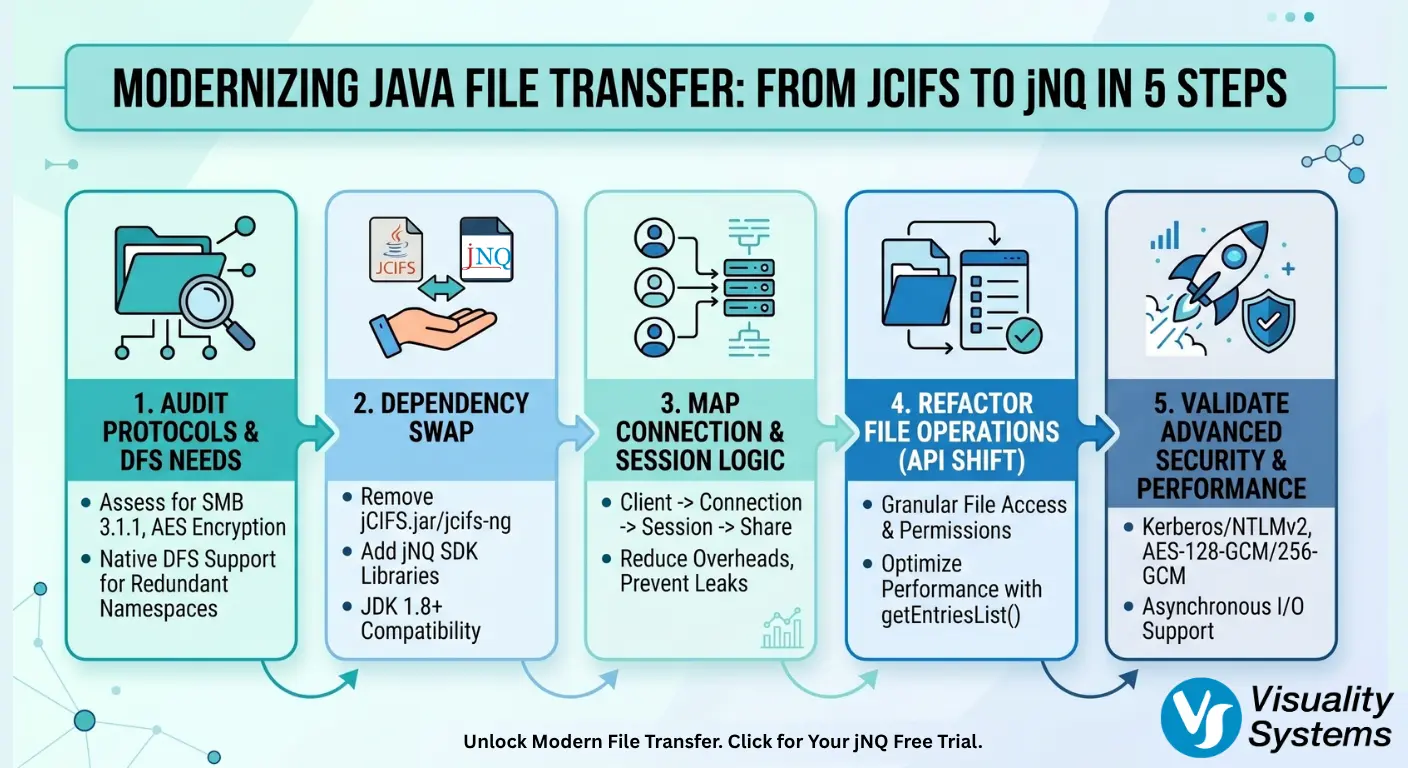

A technical infographic detailing the 5 steps to migrate from JCIFS to jNQ: 1. Audit Protocols, 2. Dependency Swap, 3. Map Connection Logic, 4. Refactor File Operations, and 5. Validate Security.

3. Map Connection and Session Logic

In JCIFS, developers often relied on a global configuration and the SmbFile class. jNQ uses a decoupled architecture: Client → Connection → Session → Share. This hierarchy provides better resource management and allows for multi-threaded I/O without connection leaks.

Pro Tip: By separating the Session from the Connection, jNQ allows you to maintain one physical connection to a server while running multiple authenticated sessions, significantly reducing handshake overhead.

4. Refactor File Operations (The API Shift)

While JCIFS tried to mimic the standard java.io.File API, jNQ provides a more granular approach that reflects the actual SMB protocol. This reduces “hidden” network round-trips that often cause performance bottlenecks in legacy systems.

Feature

JCIFS (Legacy)

jNQ (Modern)

Authentication

NTLM (often hardcoded)

NTLM, NTLMv2, Kerberos

DFS Support

Limited/Experimental

Native & Robust

File Access

SmbFileInputStream

File.open (granular Access Masks)

Listing

file.listFiles()

Directory.getEntriesList (large buffer support)

I/O Model

Synchronous

Sync & Asynchronous support

5. Validate with Enterprise Success Stories

Migration is a strategic move that pays off in stability. Seeburger, a global leader in Managed File Transfer (MFT), transitioned from JCIFS to jNQ to provide their customers with reliable SMB3 and DFS support.

Conclusion

Modernizing your Java file transfer stack isn’t just about “fixing what’s broken,” it’s about future-proofing your application against security threats and ensuring compatibility with the latest Windows and Azure storage environments.

Does your current Java application handle Distributed File System (DFS) namespaces, or are you looking to implement that as part of your migration? If so, don’t let legacy libraries hold back your enterprise security. Experience the performance and reliability of a fully supported SMB 3.1.1 stack today.

👉 Request your jNQ Free Trial here and get access to the full SDK, expert documentation, and professional technical support.

Raphael Barki, Head of Marketing, Visuality Systems

Raphael Barki, Head of Marketing, Visuality Systems

Share Via
Related Articles

Visuality systems uses technical, analytical, marketing, and other cookies. These files are necessary to ensure smooth operation of Voltabelting.com site and services and help us remember you and your settings. For details, please read our Privacy policy

Skip to content